You’re not here because you love reading about paper dimensions. You’re here because something went wrong — or almost went wrong. Maybe you typed a size into Canva and had no idea if it was right. Maybe you cut thirty bookmarks and they all stuck out of the book like little flags. Maybe you’re just trying to print something for a school event without wasting half a ream of cardstock.
Good. This is written for exactly that situation.
Start Here: The One Size That Works Almost Every Time
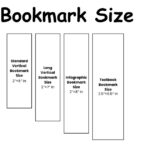
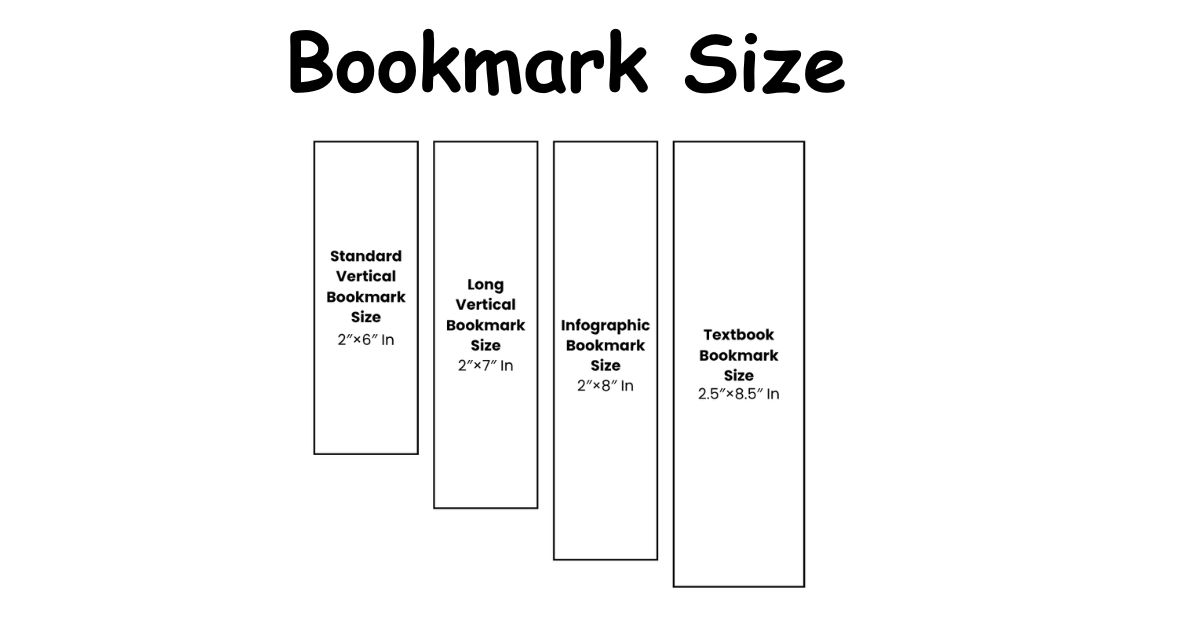
Two inches wide. Six inches tall.
That’s the size used by most print shops, most free templates, and most people who’ve made bookmarks before. It fits paperbacks. It fits hardcovers. It leaves a small tab peeking out above the pages so you can find your place without digging. And it gives you enough room to put something worth looking at on the front.
If someone asks you “what size should I make this?” — 2×6 inches is the answer until you have a reason to go a different direction.
Now, whether that actually works for your situation depends on a few things. That’s what the rest of this covers.
Why the Size Actually Matters (More Than People Expect)
Most people treat bookmark size like a formality. They pick something random, print it, and then wonder why it flops out the top of the book or disappears inside the spine.
Width causes more problems than height does. Go too narrow — under 1.75 inches — and the bookmark curls inside the book within a few days. Go too wide — past 2.5 inches — and it pushes against a hardcover spine over time, especially if the book sits on a shelf closed for weeks. The sweet spot is 2 to 2.5 inches wide, almost regardless of what height you choose.
Height is more forgiving, but there’s still a rule worth knowing: your bookmark should sit 1 to 2 inches shorter than the book it’s going into. A 6-inch bookmark in a 7-inch paperback is perfect. That same bookmark in a tall textbook looks stubby and gets lost.
Sizes for Different Situations
Not every bookmark needs to be 2×6. Here’s when the other sizes actually make sense:
Mini (2 x 3.5 inches): Think party favors, giveaways, or something tucked into a greeting card. Not much design space, but great for a single quote or a simple logo.
Tall (2 x 7 inches): Good for longer quotes or illustrations that need breathing room. Fits most standard novels without sticking out.
Extra Tall (2 x 8 inches): This is where QR codes, event info, or branded designs live. Enough space to layer content without it feeling cluttered.
Textbook size (2.5 x 8.5 inches): Thicker books need wider bookmarks. A standard 2-inch bookmark can slip down inside a dense textbook and vanish. The extra half-inch in width keeps it anchored.
| Size Name | Inches | CM | MM |
| Mini | 2 x 3.5 | 5.08 x 8.89 | 50.8 x 88.9 |
| Standard | 2 x 6 | 5.08 x 15.24 | 50.8 x 152.4 |
| Tall | 2 x 7 | 5.08 x 17.78 | 50.8 x 177.8 |
| Extra Tall | 2 x 8 | 5.08 x 20.32 | 50.8 x 203.2 |
| Textbook | 2.5 x 8.5 | 6.35 x 21.59 | 63.5 x 215.9 |
Book Type Changes Everything
Here’s something most guides skip: the bookmark size should match the book, not just your design preference.
A children’s picture book is short and wide. A 6-inch bookmark towers out of it. A coffee table book is massive — a standard bookmark barely registers inside it.
| Book Type | Typical Height | Best Bookmark Height |
| Children’s picture book | 5–8 inches | 4–5 inches |
| Paperback novel | 7–8 inches | 6 inches |
| Hardcover fiction | 8–9 inches | 6–7 inches |
| Academic textbook | 10–11 inches | 8–8.5 inches |
| Coffee table / oversized | 12+ inches | 9–10 inches |
Cut a scrap paper prototype first. Stick it in the actual book. Takes under a minute and tells you immediately if something’s off.
Working in CM and MM
If your design software uses metric — or you’re outside the U.S. — you’re probably looking for centimeter or millimeter values instead of inches.
The standard 2×6 inch bookmark is 5.08 cm wide by 15.24 cm tall, or 50.8 x 152.4 mm. Some designers round this to 51 x 152 mm for cleaner numbers, and that’s fine — the difference is invisible in real print.
For an A4 sheet layout, four standard bookmarks fit comfortably with small margins between them. That’s your most efficient setup if you’re printing in batches at home or at a copy shop.
Textbook size in metric: 6.35 x 21.59 cm or 63.5 x 215.9 mm.
Pixels: The Part That Confuses Almost Everyone
“What size is a bookmark in pixels?” is a question without one answer — and that’s exactly why it trips people up.
Pixels depend on resolution. The same physical bookmark can be 600 pixels tall or 1800 pixels tall depending on how many dots per inch your file is set to. This is where most design mistakes happen.
For printing: Work at 300 DPI. A standard 2×6 inch bookmark at 300 DPI = 600 x 1800 pixels. That’s what print shops expect. Send them anything lower and the result looks soft or blurry, even if it looked fine on your screen.
For social media graphics: Resolution rules relax a bit.
- Pinterest: 1000 x 1500 pixels (standard) or 1000 x 2100 for a longer format
- Instagram Stories: 500 x 1500 pixels works cleanly
- High-resolution future-proofing: 1200 x 3600 pixels at 600 DPI
The single most common mistake: designing at 72 DPI (screen resolution), thinking it looks sharp on the monitor, then sending it to a printer and getting a blurry result. Set your DPI at the very start of your project, not at export.
Read also: GoodNotes Paper Size: Which One Should You Actually Use?
Setting Up in Canva Without the Headaches
Canva is where most people build their bookmark designs, and the setup is straightforward once you know what to actually click.
Open a new design, choose Custom Size, and enter 2 x 6 inches or 5.08 x 15.24 cm. That’s your canvas.
Before you export, do two things:
Go to File → Show print bleed. This adds 3mm (0.125 inches) on each side so nothing important gets sliced off during trimming. Your exported file will be slightly larger than 2×6 — that’s correct.
Export as PDF Print, and if you’re going to a professional printer, select CMYK color mode. Home printers handle regular PDF just fine.
Keep your text at 18pt minimum. Smaller than that and it risks disappearing when printed, especially on colored or textured backgrounds.
What about bleed, exactly?
Bleed is just a small extension of your design beyond the final cut line. If your background is dark blue, the bleed means that dark blue extends slightly past the edge — so when the printer cuts it, there’s no thin white sliver showing at the border. Without bleed, even a slightly imperfect cut leaves a white line.
Final file with bleed: 2.25 x 6.25 inches. After trimming: 2 x 6 inches. Both are correct at different stages.
PDF Templates — What to Check Before You Print
Free PDF bookmark templates are everywhere and most of them are already sized at 2×6. But downloading the template is only half the job.
When you print, make sure your printer dialog is set to “Actual Size” or “100%” — not “Fit to Page.” That setting shrinks everything to fit the paper margin, which throws off your dimensions. A 6-inch bookmark becomes 5.7 inches and suddenly looks off inside the book.
Print on cardstock, not regular paper. The weight range to look for is 200–300 gsm (or 65–80 lb cover stock). Regular copy paper curls within a day and feels cheap in hand. Cardstock holds its shape, photographs better, and lasts.
For bulk runs — say, 50 or more — arrange four bookmarks per A4 or Letter-size sheet in your PDF layout. Most copy shops can cut them down cleanly for a small fee, and it’s far cheaper than printing them individually.
Creative Sizes That Actually Work
Going off-standard isn’t just for people who want to be different. Sometimes a specific use case genuinely calls for it.
Kids’ bookmarks do better at 1.5 x 5 inches with rounded corners. The smaller size fits children’s books properly, and rounded corners matter — sharp paper corners catch on thin pages and cause small tears over time.
Magnetic bookmarks use the standard 2×6 dimension but fold in half to create a clip. The design file before folding is technically 2×12 inches. The magnet grips the page from both sides, so it never slips down.
Horizontal bookmarks — think 6×2 inches rotated — work in oversized cookbooks or coffee table books where placing it vertically doesn’t make physical sense. Same dimensions, different orientation.
Silk ribbon bookmarks skip the cardstock entirely. A ribbon at 0.25 x 6 inches doesn’t curl in humidity the way paper does, which makes it a practical choice in places with warm, damp climates.
Read also: Index Card Sizes: Which One Do You Actually Need?
The Mistakes Worth Knowing Before You Start
Designing right up to the edge with no bleed. Already covered, but worth repeating once: add 3mm around all sides before sending to a professional printer.
Matching the bookmark length to the design instead of the book. A 2×8 bookmark looks great on screen. In a slim 7-inch novel, it flops out the top and gets bent in a bag within a week.
Choosing width based on how it looks, not how it fits. A 2.5-inch wide bookmark in a heavy hardcover that sits on a shelf puts consistent pressure on the spine. Over months, that adds up.
Skipping the test print. Print one. Check it in the actual book. Then print the rest.
Questions People Actually Ask
Does the size change if I’m making bookmarks for kids?
Yes. Go smaller — around 1.5 x 5 inches — and round the corners. It fits children’s books better and protects the pages.
What if my print shop doesn’t list “bookmark” as a size option?
Enter the dimensions manually. 2×6 inches is what you want. If they only do standard business card sizes, a business card is 2×3.5 — the mini bookmark size — which many shops have pre-set.
Is there a difference between bookmark size for digital use versus printing?
Yes. For print, 300 DPI at 600 x 1800 pixels (2×6 inches). For social media or screen display, 72 DPI is fine and you work more from pixel dimensions directly — 1000 x 1500 is a solid starting point.
How do I add a tassel hole?
Punch it 0.25 inches from the top center. A standard hole punch works. For a cleaner look, use a brass eyelet — it reinforces the hole so the paper doesn’t tear when the tassel pulls.
Can I use a bookmark in landscape orientation?
Yes. It’s just a 6×2 inch design rather than 2×6. Works best in wide-format books like cookbooks or art books where a vertical bookmark sits awkwardly.
The Short Version, If You Need It Fast
Use 2 x 6 inches for almost everything. That’s 5.08 x 15.24 cm, 50.8 x 152.4 mm, or 600 x 1800 pixels at 300 DPI.
Print on cardstock. Add 3mm bleed if going to a shop. Set DPI before you start designing, not after. Test one before printing a batch.
Everything else in this guide is for when your situation doesn’t fit the standard — and now you know exactly where to look when that happens.

I am the editor and author of StoriesRadius.com, a blog about measurements and dimensions. I enjoy turning numbers and sizes into simple stories that anyone can understand. From everyday objects to curious facts, I share clear guides based on real research and experience. My goal is to make learning about length, height, and size fun, useful, and easy for all readers.