You opened a design file and froze. Or you’re measuring a shelf and the math isn’t working out. Maybe you’re boxing up 40 DVDs to sell and need to know what postage will cost. Whatever the situation, you landed here because someone gave you a vague answer somewhere else.
This covers the real numbers — physical sizes, print specs, pixel dimensions, weights, and how DVD cases compare to Blu-ray and CD cases. No padding, no repeated explanations.
The Core Measurement First
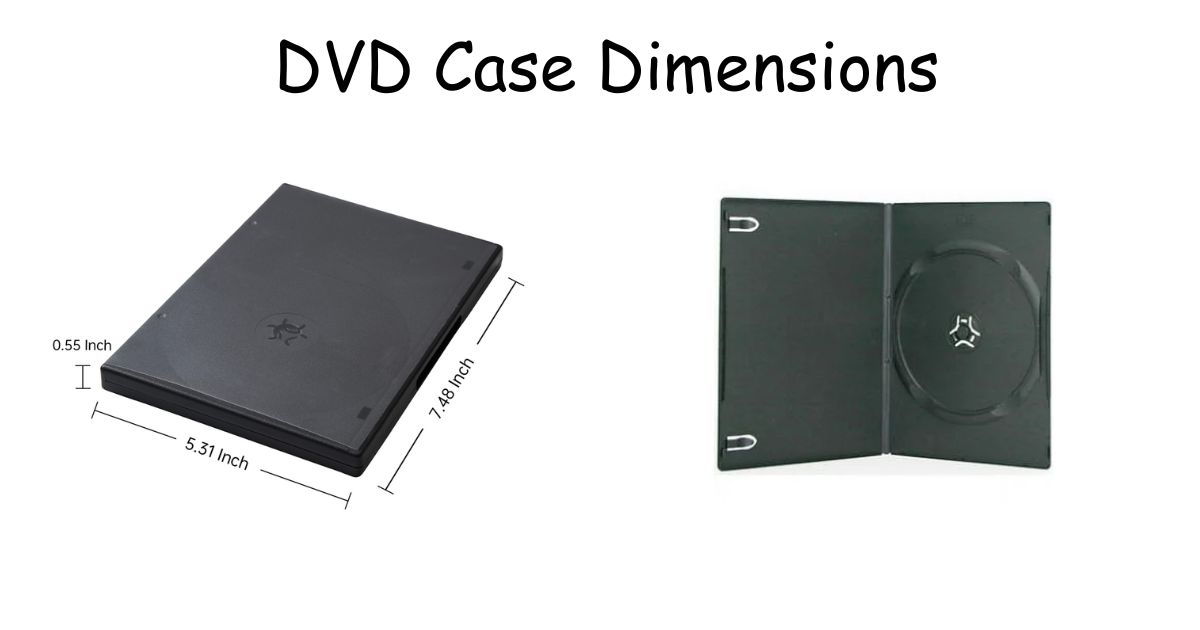
A standard single-disc DVD case is 190 mm tall, 135 mm wide, and 14 mm thick. In inches that’s 7.48 x 5.31 x 0.55. In centimeters, 19 x 13.5 x 1.4.
That’s the one size the entire industry built around. You’ll find it on rental store shelves, retail releases, and factory bulk orders. Manufacturers stick to it because it works across every standard rack, shelf bracket, and retail display built in the last 25 years.
The slim version shares the same face — same height, same width — but the thickness drops to 7 mm (0.28 inches). One disc, half the shelf space.
When Cases Get Bigger or Thinner
Not every project uses a single-disc standard case. Here’s where the sizes split:
| Case Type | Height | Width | Thickness | Discs |
| Standard | 190 mm / 7.48 in | 135 mm / 5.31 in | 14 mm / 0.55 in | 1 |
| Slim | 190 mm / 7.48 in | 135 mm / 5.31 in | 7 mm / 0.28 in | 1 |
| Double | 190 mm / 7.48 in | 135 mm / 5.31 in | 25 mm / 0.98 in | 2 |
| Multi (4–6 disc) | 190.5 mm / 7.50 in | 133.35 mm / 5.25 in | 39 mm / 1.54 in | 4–6 |
| SteelBook | 190 mm / 7.48 in | 136 mm / 5.35 in | 15 mm / 0.59 in | 1 |
The multi-disc case is the one that surprises people. It’s slightly shorter in width and nearly 3x as thick as a standard. TV season box sets use these, and if you’re designing a custom cover or building a shelf unit for them, that 39 mm thickness changes your math completely.
SteelBooks are only 1 mm wider than a regular case — barely noticeable on a shelf, but worth knowing if you’re building a tight custom display unit where every millimeter counts.
Printing a Custom Cover
This is where most people hit problems. The physical case size and the printable cover size are not the same number.
The full wraparound cover — front panel, spine, and back panel as one connected sheet — measures 273 x 184 mm (10.75 x 7.25 inches). That’s the paper that slides inside the clear outer sleeve.
| Artwork Piece | Dimensions (mm) | Dimensions (inches) |
| Full wraparound cover | 273 x 184 | 10.75 x 7.25 |
| Front + back panels | 270 x 183 | 10.63 x 7.20 |
| Spine (standard case) | 14 x 183 | 0.55 x 7.20 |
| Inner tray liner | 185 x 125 | 7.28 x 4.94 |
| Booklet page | 132 x 182 | 5.20 x 7.17 |
The bleed zone — that 3 mm extra border on each edge — isn’t optional if you want clean edges. Skip it and even a slightly off cut shows a white strip along one side. Print a test on plain paper before touching your good stock.
Spine width must match your actual case. Standard is 14 mm. Slim is 7 mm. Double is 25 mm. People grab a random template without checking, then wonder why their title is floating in blank space or getting chopped off at the edges.
Pixel Dimensions for Digital Design
At 300 DPI — the standard for print-quality output:
- Front cover panel: 3,165 x 2,130 pixels
- Full wraparound: 7,950 x 2,835 pixels
Set your Photoshop or GIMP document to 7.48 x 10.75 inches at 300 DPI. Place guides at 0.15 inches from each edge to mark your bleed boundary. Export as PDF with crop marks on — it makes trimming far more accurate.
For web mockups or online listings where you just need a preview image, 72 DPI is enough. That lands around 759 x 515 pixels per face — loads fast, looks fine on screen, and won’t slow down your product page.
One thing people skip: flatten your layers before exporting. Unflattened files shift slightly at fold lines and the sections don’t line up with the physical case once printed.
Weight — Especially Relevant for Sellers
An empty standard case weighs 80–100 grams (2.8–3.5 oz). Add a disc and booklet and you’re at roughly 120 grams.
Slim cases run about 20–30 grams lighter per unit. Doesn’t sound like much until you’re mailing 30 of them. A run of 50 standard cases hits close to 10 pounds before you add any packaging material.
Multi-disc cases land at 200+ grams depending on disc count. If you’re calculating postage on a batch of box sets, weigh a sample unit first rather than estimating.
Read Also: Chip Bag Sizes: What the Numbers Actually Mean Before You Buy
DVD vs. Blu-ray vs. CD — What’s Actually Different
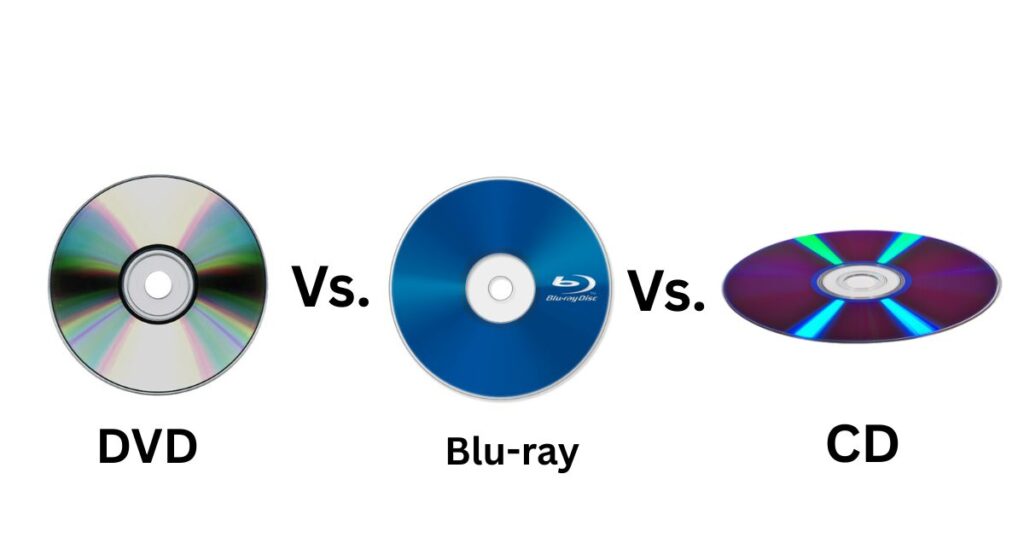
| Format | Height | Width | Thickness |
| DVD | 190 mm | 135 mm | 14 mm |
| Blu-ray | 190 mm | 135 mm | 15 mm |
| CD Jewel Case | 142 mm | 125 mm | 10 mm |
DVD and Blu-ray cases are nearly identical. Same height, same width — just 1 mm apart in thickness. They sit together on a shelf without any visual clash, which is why mixed collections usually work fine.
CD jewel cases are a different category. They’re 48 mm shorter and 10 mm narrower. On a shelf next to DVDs, they look noticeably out of place and tend to lean and topple without a divider separating them. If you have both formats, a simple shelf divider between them keeps everything upright and organized.
Shelf Planning and Storage Math
Standard cases fit roughly 45–50 per linear foot of shelf space. Slim cases push that to 70+ — nearly double the density in the same shelf length.
To calculate for your specific shelf: measure the length in inches and divide by 0.55 (standard) or 0.28 (slim) per case.
For box storage, 100 standard cases need roughly a 20 x 12 x 6 inch container with padding room. Multi-disc cases need wider bins because of their 39 mm girth — a regular media storage box won’t close properly if you stack them sideways.
What Trips People Up
Designing for the wrong spine width is the most common print mistake. A template built for a standard 14 mm spine looks wrong on a slim case. The title either crowds the edges or floats awkwardly if you don’t adjust before printing.
Using 72 DPI for print output is the second one. Looks sharp on screen, prints blurry. Always 300 DPI for anything physical.
Mixing CD and DVD cases on an open shelf without dividers creates a toppling problem. CD cases are shorter and lean into DVD cases, which then lean into each other. A $3 shelf divider solves it.
Underestimating shipping weight when selling in bulk. Eyeballing it costs money at the counter. Weigh a sample, multiply by quantity, then calculate postage.
Read Also: How Big Is 2mm? 12 Common Things That Are 2mm Long or Big
Quick Reference
What size is a DVD case in mm?
190 x 135 x 14 mm for a standard single-disc case.
What size in inches?
7.48 x 5.31 x 0.55 inches.
What size in cm?
19 x 13.5 x 1.4 cm.
Are Blu-ray and DVD cases interchangeable for cover design?
Height and width are the same. The spine differs by 1 mm — usually not enough to notice, but worth adjusting if you’re printing a custom cover.
What Photoshop size for a DVD cover?
7.48 x 10.75 inches at 300 DPI. Add 0.15-inch bleed guides on all four edges.
How heavy is a DVD case for shipping?
Standard with disc and booklet: roughly 120 grams. Slim: about 90–100 grams. Multi-disc: 200+ grams.
What You Actually Need to Remember
For printing: the full cover is 273 x 184 mm, the spine must match your exact case type, and the bleed margin is 3 mm per side.
For shelf planning: standard cases are 14 mm thick, slim cases are 7 mm. Everything else builds off those two numbers.
For shipping: weigh before you buy postage. The difference between slim and standard adds up fast at scale.
That’s the whole picture. No templates to buy, no conversion tools needed — just the numbers that actually solve the problem.

I am the editor and author of StoriesRadius.com, a blog about measurements and dimensions. I enjoy turning numbers and sizes into simple stories that anyone can understand. From everyday objects to curious facts, I share clear guides based on real research and experience. My goal is to make learning about length, height, and size fun, useful, and easy for all readers.