You opened Canva to make some flashcards. Simple enough, right? Then it asked you to set a size and you froze. Do you pick 3×5? 4×6? What even is A6? And if you’re printing them at home, will they actually come out right?
This happens to almost everyone. Flashcard size sounds like a tiny detail — but picking the wrong one means your cards are too cramped to read, too big to carry, or just awkward to use. Let’s clear all of this up.
What “Flash Card Size” Actually Means
A flashcard is a small card with a question or word on one side and the answer on the other. The size you pick changes how much you can write, how easy it is to carry, and whether the card actually helps you learn or just frustrates you.
There’s no single “correct” size. There are a few standard sizes that have become popular over the years, each one suited to different situations. Knowing which one fits your needs saves you from printing 50 cards that are too small to write on — or too big to take anywhere.
Who’s Actually Looking This Up (And Why)
People searching for flash card size are usually in one of these situations:
Students want to know the standard size so their homemade cards match what their class uses or what apps like Anki and Quizlet expect. They’re often also trying to print them at home without wasting paper.
Teachers and parents want bigger cards — something kids can actually see from across a table, with room for a picture or a colorful diagram.
Designers and people using Canva need the exact pixel or inch dimensions to set up their file correctly before they start designing. Getting this wrong means reprinting everything.
People buying pre-made cards just want to know what size to order so they can write on them comfortably — and whether a 3×5 or a 4×6 makes more sense for what they’re studying.
The Standard Sizes, Explained Simply
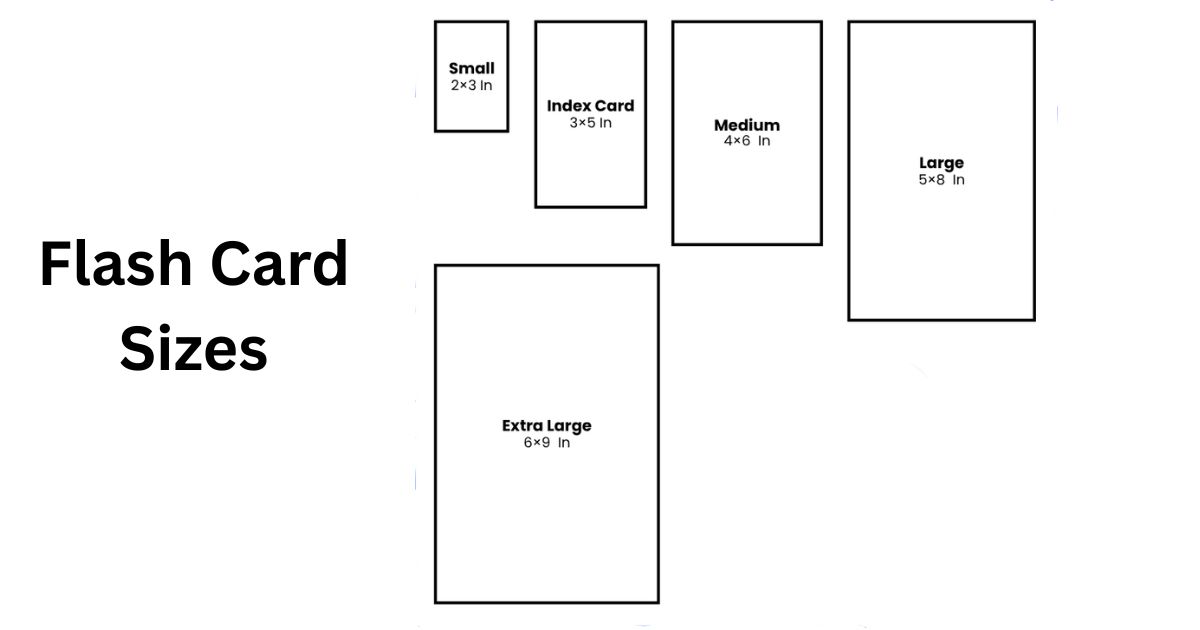
Here’s a plain breakdown of the most common flashcard sizes and when each one actually works well:
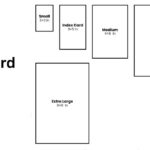
| Size | Inches | Centimeters | Best For |
| Small / Pocket | 2 x 3.5 in | 5.1 x 8.9 cm | Single words, quick vocabulary |
| Standard | 3 x 5 in | 7.6 x 12.7 cm | Most personal study needs |
| Medium | 4 x 6 in | 10.2 x 15.2 cm | Diagrams, anatomy, history |
| Large | 5 x 8 in | 12.7 x 20.3 cm | Complex topics, classroom use |
| Kids / Classroom | 5 x 7 in | 12.7 x 17.8 cm | Early education, group display |
The 3×5 inch card is the most popular by far. It started as a standard index card size (you’ve probably seen those at office supply stores). It fits in your hand, holds a decent amount of text, and works for nearly every subject. Most flashcard apps and templates are built around this size.
The 4×6 inch card gives you about 60% more writing space. That matters when you’re studying something that needs a sketch — like a cell diagram for biology or a map for geography. It’s harder to carry around but great for desk studying.
The 2×3.5 inch card is basically credit card size. It forces you to write only the most important thing, which is actually a good thing for memory. If you’re reviewing vocabulary on the bus or in a waiting room, these are ideal.
The 5×8 inch card is for when you need to spread out. Think medical students mapping out a process, or a teacher holding up a card for a whole classroom to see.
Read Also: Chip Bag Sizes: What the Numbers Actually Mean Before You Buy
Flash Card Size in cm and mm
If you’re outside the US or just prefer metric, here’s the same info in centimeters and millimeters:
| Size Name | Inches | cm | mm |
| 2 x 3.5 | 5.1 x 8.9 cm | 51 x 89 mm | |
| Standard | 3 x 5 | 7.6 x 12.7 cm | 76 x 127 mm |
| Medium | 4 x 6 | 10.2 x 15.2 cm | 102 x 152 mm |
| Large | 5 x 8 | 12.7 x 20.3 cm | 127 x 203 mm |
One size worth knowing: A6 (10.5 x 14.8 cm) is a common international paper size that’s very close to 4×6 inches. If you’re in Europe or Australia and looking for pre-cut cardstock, A6 is easy to find and works perfectly as a flashcard. It’s exactly one quarter of a standard A4 sheet, so you can print four cards per page and cut them yourself.
A7 (7.4 x 10.5 cm) is even smaller — fits eight cards on one A4 sheet. Great for bulk printing when you need a lot of cards fast.
Flash Card Size in Pixels (For Digital and Printing)
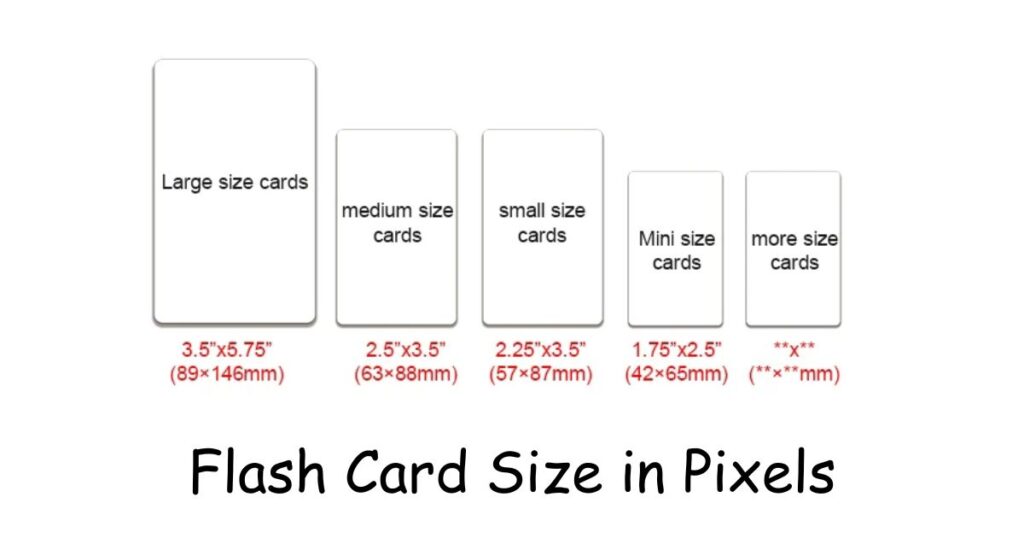
If you’re making cards on a computer — using Canva, Google Slides, Photoshop, or anything else — you’ll need to think in pixels too.
The key number here is DPI (dots per inch). For printing, you want 300 DPI. For screen-only use, 72–96 DPI is fine.
| Size | Inches | Pixels at 300 DPI | Good For |
| 2 x 3.5 | 600 x 1050 px | Mobile apps | |
| Standard | 3 x 5 | 900 x 1500 px | Anki, Quizlet, home printing |
| Medium | 4 x 6 | 1200 x 1800 px | Canva, detailed designs |
| Large | 5 x 8 | 1500 x 2400 px | Desktop apps, classroom print |
If you’re making cards just for a phone or tablet screen, a lot of apps use 1080 x 1920 pixels (portrait/vertical). That’s basically a full phone screen, and it works well for digital-only decks.
Quizlet generally works with 800 x 600 pixels for web viewing. Canva’s flashcard templates often start at 1920 x 1080 pixels for slideshow-style presentations.
If you’re printing at home and want clean, sharp edges, use 900 x 1500 pixels (the 3×5 at 300 DPI). That’s the sweet spot for most home printers.
Printable Flashcards: How to Set It Up Right
Printing your own cards is cheaper than buying them and lets you customize everything. Here’s how to actually get it right:
In Google Docs or Word: Go to page setup, set a custom size — for example, 3 x 5 inches. Type your content, then duplicate the page for each card. Export as PDF and print on cardstock.
In Canva: Search “flashcard” in templates or create a custom size. Type in 3 x 5 inches (or 3.5 x 5.5 if you want a small bleed margin). Design both sides, then download as a print-ready PDF.
Tip on paper: Regular printer paper bends and tears fast. Use 110–200 gsm cardstock for cards that last. If you want to reuse them or write with dry-erase markers, laminate them after printing.
Fitting multiple cards on one sheet:
- 3×5 cards: 4 per letter-size sheet (landscape layout)
- A6 cards: 4 per A4 sheet
- A7 cards: 8 per A4 sheet
- Pocket cards (2×3.5): 6–8 per sheet depending on margins
Always add at least 0.125 inches (3mm) of bleed if you’re sending cards to a professional printer. That’s extra space around the edges so there are no white lines when they cut the cards.
Read Also: Pokémon Card Dimensions: Everything You Actually Need to Know
What People Usually Get Wrong
Writing too much on one card. This is the biggest mistake. A card crammed with five sentences defeats the whole point. One idea per card. That’s it. If you feel like you need more space, the answer isn’t a bigger card — it’s splitting the topic into two cards.
Choosing size based on what looks nice, not what works. Bigger cards feel satisfying to make. But if you’re studying on a train or at a desk with limited space, a big card is just annoying. Think about where you’ll actually use the cards before you pick a size.
Printing at 72 DPI and wondering why it looks blurry. Screen resolution and print resolution are different. If you’re printing, always set your file to 300 DPI.
Forgetting about margins. If your text goes right to the edge of the card, it’ll look messy after cutting. Keep at least a quarter inch of space around your content.
Skipping the A6 option. A lot of people in countries that use A4 paper don’t realize A6 is basically a flashcard size already. You can buy pre-cut A6 cardstock, skip all the measuring, and be done with it.
Real-Life Examples of Choosing the Right Size
A college student studying Spanish vocabulary used 2×3.5 pocket cards. One word per card, kept in a rubber band in her jacket pocket. She reviewed them while waiting for class. Small cards forced her to keep it simple.
A high school teacher made 5×7 cards for a geography unit — each card had a country outline on the front and the capital city on the back. Big enough for students in the back row to see. She printed them at home on cardstock, laminated them, and reused them every year.
A medical student used 4×6 cards for anatomy. On the front: “What are the four chambers of the heart?” On the back: a labeled diagram he drew by hand. The extra space made the drawing actually readable.
A parent made alphabet cards for a 4-year-old using 5×8 inch cards. Big font, colorful border, simple picture. The large size made them easy for small hands to hold and hard to lose under the couch cushions.
Common Questions People Ask
What is the standard flashcard size?
The most widely used size is 3 x 5 inches (7.6 x 12.7 cm). It’s what most index cards are cut to, and what most flashcard apps are built around.
What size is a flashcard in cm?
A standard 3×5 card is 7.6 x 12.7 cm. A 4×6 card is 10.2 x 15.2 cm. If you’re using A6 paper (common in Europe), that’s 10.5 x 14.8 cm — nearly identical to 4×6.
What’s the best flashcard size for Anki or Quizlet?
Both apps work well with 900 x 1500 pixels (3×5 at 300 DPI) for printed cards. For digital-only use, those platforms scale images automatically, so size matters less than clarity.
Can I print flashcards on regular paper?
You can, but they won’t hold up well. Regular printer paper is too thin and flimsy. Cardstock at 110 gsm or heavier is much better. It feels more like a real card and doesn’t bend when you shuffle through your deck.
What size is a flashcard in pixels for Canva?
Set your Canva file to 900 x 1500 pixels for a standard 3×5 card at print quality. For digital-only decks, 1920 x 1080 works well in presentation mode.
How do I print 4 flashcards per page?
Set your document to A4 or letter size in landscape mode. Place four cards in a 2×2 grid. Use guides or a table in Word to keep them aligned. Print on cardstock, then cut.
What Actually Matters Most
All the sizes and pixel numbers and DPI specs are secondary to one thing: does the card work for how you study?
If you’re always on the go, go small. If you study at a desk and your subject needs visuals, go medium or large. If you’re making cards for a classroom or kids, go big enough to see clearly.
The 3×5 standard exists because it works for most people in most situations. Start there. If you find yourself cramming too much onto your cards, try 4×6. If you barely fill half the card, drop down to pocket size.
Pick the size that matches your habits, not the one that looks most impressive in a template gallery. A perfect-looking card you never use is just paper. A beat-up 3×5 card you’ve flipped through 50 times? That’s the one that actually taught you something.

I am the editor and author of StoriesRadius.com, a blog about measurements and dimensions. I enjoy turning numbers and sizes into simple stories that anyone can understand. From everyday objects to curious facts, I share clear guides based on real research and experience. My goal is to make learning about length, height, and size fun, useful, and easy for all readers.